
About this Script
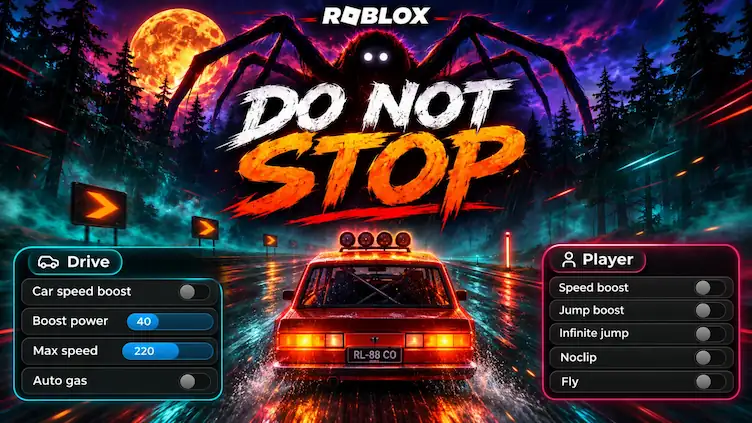
A powerful Rayfiled hub by DarkSpawner script helps you to survive Route 1610.
Drive
- Car speed boost (hold Shift, or always-on for mobile) with power and max speed sliders
- Auto gas (beta)
- Live car speed
- Warning pop-up when the Runner gets close
ESP
- When you enable ESP, you can see the enemies around you, including those trying to catch you. It also shows their distance
- from your vehicle, helping you know how close they are and prepare for danger.”Monster ESP: Runner, Watchers,
- Scarecrows with distance
- Thrown object ESP
- Roadblock + jump ESP
- Fullbright and no fog to see the road at night
Codes
- “Now, the two main working codes are RELEASE and ROUTE1610, which you can redeem to receive free credits, keys, and many more rewards in Do Not Stop!
- Live Credits, Level and XP
Player
- “Now, in the Player section, you’ll find several useful features, including Speed Boost, WalkSpeed, Jump Boost, JumpPower, Infinite Jump, Noclip, and Fly. You can also adjust your movement speed, jump power, and flying speed to customize your gameplay experience.”
- Speed, jump, infinite jump, noclip, fly, player ESP, FOV
- Anti-AFK, STOP ALL, panic key K
Key: press Get Key, finish the short LootLabs link, paste the daily key.
Script Key Features
Compatible Roblox Executors
Explore more scripts for this game (2)
Views
540+
Likes
0
Dislikes
0
Posted
1 week ago
Updated
2 days ago
Key System
Yes
Mobile
Supported
Lua Script
loadstring(game:HttpGet("https://scriptblox.com/raw/Do-Not-Stop-Monster-ESP-Car-Boost-Codes-or-DarkSpawner-Hub-236145"))()How to run this script with Delta Executor
2
Copy the Lua Script Code
Click the copy button above. The full loadstring is placed on your clipboard instantly.
3
Paste & Execute
Paste the loadstring into the Delta Executor and hit Execute clipboard. Wait until script GUI opens inside the Roblox game.
More Scripts for Roblox
View All
Roblox Games






Comments
0Share what works, ask questions, or report an issue.
Sign in to join the discussion
Sign in with your Google account to post comments, leave replies, and react.
No comments yet. Be the first to comment!