
About this Script
Features
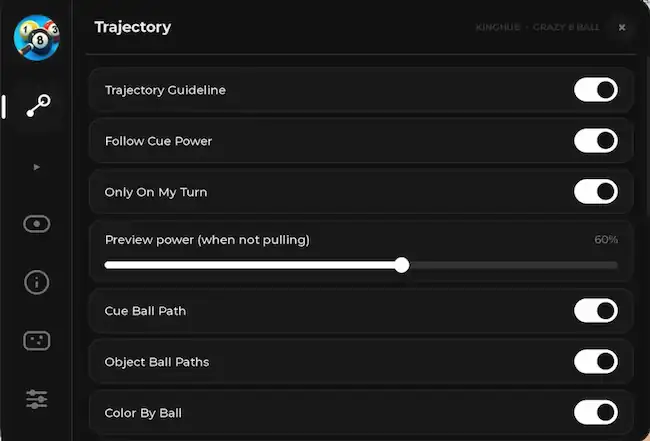
- Trajectory Guideline
- Follow Cue Power
- Only On My Turn
- Preview Power (When Not Pulling)
- Cue Ball Path
- Object Ball Paths
- Color By Ball
- Ghost Ball
- Stop / Pot Markers
- Path Time Shown
- Opponent Guideline
- Other Tables
- Line Thickness
- Line Opacity
- Auto Play
- Auto Play
- Think Delay
- Play One Shot Now
- ESP
- Ball ESP
- Ball Numbers
- Pocket Markers
- All Nearby Tables
- ESP Fill
- Daylight
- Info
- Match HUD
- Shot Preview
- Power Bar
- Performance
Script Key Features
Compatible Roblox Executors
Explore more scripts for this game (1)
Views
6+
Likes
0
Dislikes
0
Posted
4 hours ago
Updated
3 hours ago
Key System
No
Mobile
Supported
Lua Script
loadstring(game:HttpGet("https://gist.githubusercontent.com/David566734/f57e7529de918c262a94ed814d51242e/raw/"))()How to run this script with Delta Executor
2
Copy the Lua Script Code
Click the copy button above. The full loadstring is placed on your clipboard instantly.
3
Paste & Execute
Paste the loadstring into the Delta Executor and hit Execute clipboard. Wait until script GUI opens inside the Roblox game.
More Scripts for Roblox
View All
3746
3 months ago
No Key
Blox Fruits
3 likes
Blox Fruits – X100 Luck Script – 🧲Update Meow Hub V1.0 – Free Dragon – Working – Overpower- Fixed
@BlackWater

3575
1 month ago
No Key
Solve the Cube
9 likes
Solve the Cube Script No Key – Auto Solve, Auto Ready, Auto Sit, Auto Buy Chairs
@Sensei_Yusuf
3393
2 months ago
No Key
Steal an Egg
7 likes
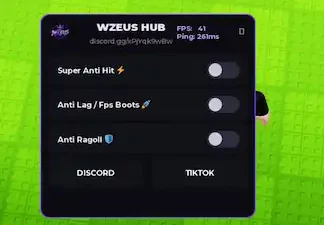
Steal an Egg Script No Key – Super Anti Hit, Anti Lag, Anti Ragdoll – WZEUS HUB Delta Roblox Scripts 2026
@BlackWater
2738
3 months ago
Key
Steal an Egg
8 likes
Steal an Egg Script OMG Hub – Multi Instant Steal, Instant Steal, Tween Steal, Instant Claim & New OP
@Shamax

2269
3 weeks ago
No Key
Steal an Egg
14 likes
Steal an Egg Script – Best Egg Finder
@BlackWater
2175
2 months ago
No Key
Piggy
1 likes
Piggy Tiger X Hub Script Keyless | Auto Find Pages, Fling Bots, Map Stealer & ESP
@BlackWater
Roblox Games






Comments
0Share what works, ask questions, or report an issue.
Sign in to join the discussion
Sign in with your Google account to post comments, leave replies, and react.
No comments yet. Be the first to comment!