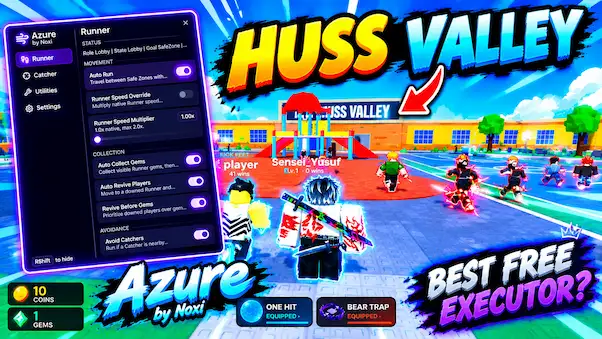

About this Script
- Auto Collect Gems
- Auto Run
- Auto Chase
- Auto Melee
- Auto Tackle
- Auto Revive Players
- Avoid Catchers
- Threat Prediction
- Smart Targeting
- Auto Dash
- Instant Revive
- Auto Farm Gems
- Follow Target
- Speed Boost
- Catcher Speed Boost
- Threat ESP
- Hitbox ESP
- Emergency Safe Zone
- Attack Priority
- Tackle Range
Script Key Features
Compatible Roblox Executors
Explore more scripts for this game (2)
Views
107+
Likes
0
Dislikes
0
Posted
5 days ago
Updated
5 days ago
Key System
No
Mobile
Supported
Lua Script
-- Script from https://delta-executorr.com/roblox --

loadstring(game:HttpGet("https://raw.githubusercontent.com/NoxiTheDeveloper/scriptlp/main/lua.v0id.lua"))()How to run this script with Delta Executor
2
Copy the Lua Script Code
Click the copy button above. The full loadstring is placed on your clipboard instantly.
3
Paste & Execute
Paste the loadstring into the Delta Executor and hit Execute clipboard. Wait until script GUI opens inside the Roblox game.
More Scripts for Huss Valley
View All
Roblox Games
![[🍬] Swim For Eggs!](https://tr.rbxcdn.com/180DAY-f3dab9b0937ad6a1f27632b6dfaff3c2/150/150/Image/Png/noFilter)
![[🛡️FACTIONS🛡️] Entrenched](https://tr.rbxcdn.com/180DAY-6e71e98b2c981ccc2254bc62b82f6c5e/150/150/Image/Png/noFilter)



Comments
0Share what works, ask questions, or report an issue.
Sign in to join the discussion
Sign in with your Google account to post comments, leave replies, and react.


No comments yet. Be the first to comment!