
About this Script
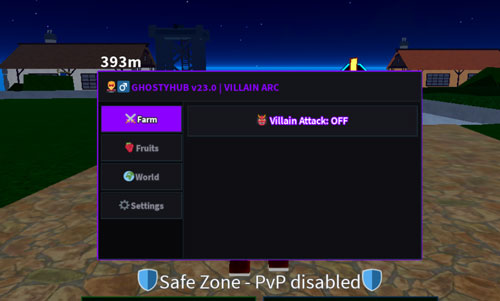
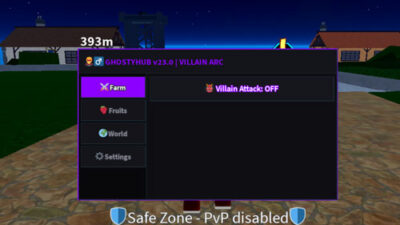
GHOSTYHUB script for Blox Fruits Roblox offers tools like villain auto attack, and teleport to make your game better. GHOSTYHUB v23.0 is keyless and tested with delta executor on Sep 12, 2026.
Features
+ Villain Auto Attack: Fast mobile click simulation that works with Combat styles and Swords.
+ Fruit Teleport Scanner: Automatically warps your character directly onto any spawned map fruit.
+ Bypass Speed: Increases your movement speed locally without changing your WalkSpeed variable.Roblox game titles
+ Destroy UI: Safely closes the menu and clears it from your screen.
Lua Script
-- [[ GHOSTYHUB v23.0 - 100% GUARANTEED DELTA EXECUTION ]] --
-- No external links, No crashes, No empty tabs! Built purely for Android

local ScreenGui = Instance.new("ScreenGui")
ScreenGui.Name = "GhostyHubFinal"
ScreenGui.Parent = game.CoreGui
ScreenGui.ResetOnSpawn = false

-- Main Premium Window (Sleek Dark Purple Neon)
local MainFrame = Instance.new("Frame")
MainFrame.Name = "MainFrame"
MainFrame.Parent = ScreenGui
MainFrame.BackgroundColor3 = Color3.fromRGB(12, 12, 16)
MainFrame.Position = UDim2.new(0.5, -190, 0.5, -110)
MainFrame.Size = UDim2.new(0, 380, 0, 220)
MainFrame.Active = true
MainFrame.Draggable = true

local UIStroke = Instance.new("UIStroke")
UIStroke.Parent = MainFrame
UIStroke.Thickness = 2
UIStroke.Color = Color3.fromRGB(140, 0, 255)

-- Header Title
local Title = Instance.new("TextLabel")
Title.Parent = MainFrame
Title.BackgroundColor3 = Color3.fromRGB(20, 20, 26)
Title.Size = UDim2.new(1, 0, 0, 35)
Title.Font = Enum.Font.SourceSansBold
Title.Text = "   🦹♂️ GHOSTYHUB v23.0 | VILLAIN ARC"
Title.TextColor3 = Color3.fromRGB(140, 0, 255)
Title.TextSize = 15
Title.TextXAlignment = Enum.TextXAlignment.Left

-- Sidebar for Tabs
local Sidebar = Instance.new("Frame")
Sidebar.Name = "Sidebar"
Sidebar.Parent = MainFrame
Sidebar.BackgroundColor3 = Color3.fromRGB(8, 8, 10)
Sidebar.Position = UDim2.new(0, 0, 0, 35)
Sidebar.Size = UDim2.new(0, 100, 1, -35)

-- Content Frame for Features
local ContentFrame = Instance.new("Frame")
ContentFrame.Name = "ContentFrame"
ContentFrame.Parent = MainFrame
ContentFrame.BackgroundColor3 = Color3.fromRGB(14, 14, 18)
ContentFrame.Position = UDim2.new(0, 100, 0, 35)
ContentFrame.Size = UDim2.new(1, -100, 1, -35)

local Tabs = {}
local tabCount = 0

local function CreateTab(name)
    tabCount = tabCount + 1

    local TabPage = Instance.new("Frame")
    TabPage.Name = name .. "Page"
    TabPage.Parent = ContentFrame
    TabPage.Size = UDim2.new(1, -10, 1, -10)
    TabPage.Position = UDim2.new(0, 5, 0, 5)
    TabPage.BackgroundTransparency = 1
    TabPage.Visible = false

    local UIListLayout = Instance.new("UIListLayout")
    UIListLayout.Parent = TabPage
    UIListLayout.SortOrder = Enum.SortOrder.LayoutOrder
    UIListLayout.Padding = UDim.new(0, 6)

    local TabButton = Instance.new("TextButton")
    TabButton.Name = name .. "Btn"
    TabButton.Parent = Sidebar
    TabButton.Size = UDim2.new(1, -6, 0, 30)
    TabButton.Position = UDim2.new(0, 3, 0, (tabCount - 1) * 34 + 5)
    TabButton.BackgroundColor3 = Color3.fromRGB(20, 20, 25)
    TabButton.Font = Enum.Font.SourceSansBold
    TabButton.Text = name
    TabButton.TextColor3 = Color3.fromRGB(140, 140, 150)
    TabButton.TextSize = 13

    local BStroke = Instance.new("UIStroke")
    BStroke.Parent = TabButton
    BStroke.Color = Color3.fromRGB(40, 40, 50)

    TabButton.MouseButton1Click:Connect(function()
        for _, t in pairs(Tabs) do
            t.Page.Visible = false
            t.Btn.BackgroundColor3 = Color3.fromRGB(20, 20, 25)
            t.Btn.TextColor3 = Color3.fromRGB(140, 140, 150)
        end
        TabPage.Visible = true
        TabButton.BackgroundColor3 = Color3.fromRGB(140, 0, 255)
        TabButton.TextColor3 = Color3.fromRGB(255, 255, 255)
    end)

    Tabs[name] = {Page = TabPage, Btn = TabButton}
    return TabPage
end

local function AddButton(page, text, callback)
    local Btn = Instance.new("TextButton")
    Btn.Size = UDim2.new(1, 0, 0, 35)
    Btn.BackgroundColor3 = Color3.fromRGB(22, 22, 28)
    Btn.Font = Enum.Font.SourceSansSemibold
    Btn.Text = text
    Btn.TextColor3 = Color3.fromRGB(255, 255, 255)
    Btn.TextSize = 14
    Btn.Parent = page

    local BStroke = Instance.new("UIStroke")
    BStroke.Parent = Btn
    BStroke.Color = Color3.fromRGB(140, 0, 255)

    Btn.MouseButton1Click:Connect(function()
        callback(Btn)
    end)
end

-- ==================== GENERATING 4 TABS ====================
local CombatTab = CreateTab("⚔️ Farm")
local FruitTab = CreateTab("🍓 Fruits")
local WorldTab = CreateTab("🌍 World")
local SettingsTab = CreateTab("⚙️ Settings")

Tabs["⚔️ Farm"].Page.Visible = true
Tabs["⚔️ Farm"].Btn.BackgroundColor3 = Color3.fromRGB(140, 0, 255)
Tabs["⚔️ Farm"].Btn.TextColor3 = Color3.fromRGB(255, 255, 255)

-- TAB 1: COMBAT (THE VILLAIN ARC ATTACK)
local attackActive = false
AddButton(CombatTab, "👹 Villain Attack: OFF", function(btn)
    attackActive = not attackActive
    if attackActive then
        btn.Text = "👹 Villain Attack: ON"
        btn.TextColor3 = Color3.fromRGB(0, 255, 0)
        task.spawn(function()
            while attackActive do
                task.wait(0.1)
                pcall(function()
                    -- Forces character tool swing animation
                    local tool = game.Players.LocalPlayer.Character:FindFirstChildOfClass("Tool")
                    if tool then tool:Activate() end

                    -- Unblockable mobile hardware click emulation
                    local inputService = game:GetService("VirtualInputManager")
                    inputService:SendMouseButtonEvent(0, 0, 0, true, game, 0)
                    task.wait(0.01)
                    inputService:SendMouseButtonEvent(0, 0, 0, false, game, 0)
                end)
            end
        end)
    else
        btn.Text = "👹 Villain Attack: OFF"
        btn.TextColor3 = Color3.fromRGB(255, 255, 255)
    end
end)

-- TAB 2: FRUIT SPAWNER
AddButton(FruitTab, "🍓 Teleport to Spawned Fruit", function()
    local found = false
    for _, obj in pairs(workspace:GetChildren()) do
        if obj:IsA("Tool") and (obj.Name:find("Fruit") or obj.Name:find("Fruit ")) then
            local hrp = game.Players.LocalPlayer.Character:FindFirstChild("HumanoidRootPart")
            if hrp and obj:FindFirstChild("Handle") then
                hrp.CFrame = obj.Handle.CFrame
                found = true
                break
            end
        end
    end
    if not found then
        game:GetService("StarterGui"):SetCore("SendNotification", {
            Title = "GHOSTYHUB",
            Text = "No fruit found on the floor!",
            Duration = 3
        })
    end
end)

-- TAB 3: WORLD BYPASSES
local speedActive = false
AddButton(WorldTab, "⚡ Smooth Bypass Speed: OFF", function(btn)
    speedActive = not speedActive
    if speedActive then
        btn.Text = "⚡ Smooth Bypass Speed: ON"
        btn.TextColor3 = Color3.fromRGB(0, 255, 0)
        task.spawn(function()
            while speedActive do
                task.wait(0.01)
                pcall(function()
                    local char = game.Players.LocalPlayer.Character
                    local hrp = char:FindFirstChild("HumanoidRootPart")
                    local hum = char:FindFirstChild("Humanoid")
                    if hrp and hum and hum.MoveDirection.Magnitude > 0 then
                        hrp.CFrame = hrp.CFrame + (hum.MoveDirection * 1.8)
                    end
                end)
            end
        end)
    else
        btn.Text = "⚡ Smooth Bypass Speed: OFF"
        btn.TextColor3 = Color3.fromRGB(255, 255, 255)
    end
end)

-- TAB 4: SETTINGS
AddButton(SettingsTab, "❌ Destroy GHOSTYHUB", function()
    ScreenGui:Destroy()
end)How to run this script with Delta Executor
Copy the Lua Script Code
Click the copy button above. The full loadstring is placed on your clipboard instantly.
Paste & Execute
Paste the loadstring into the Delta Executor and hit Execute clipboard. Wait until script GUI opens inside the Roblox game.
More Scripts for Blox Fruits
View All
Blox Fruits – X100 Luck Script – 🧲Update Meow Hub V1.0 – Free Dragon – Working – Overpower- Fixed
Blox Fruits Synergy X Hub Script, New Magnet 5000 Farm, Instant TP Chest, OP One HIT EVERYTHING!
Blox Fruits Teddy Hub Script, Auto Farm Magnet Token, New Update 30, Auto Random Magnet Token, Prison Event
Blox Fruits OP Script No Key – Gravity Hub | Auto Farm, Magnet Tokens, Raid, Fruit ESP, Auto Quest
Blox Furits Script | Solix Hub | UPD 30, New Update, Auto Farm
Blox Fruit | Mobile REDZ HUB V4 UPDATE 30 | 🧲 AUTO FARM, Magnet Token Farm, Raid, Updated Script
Roblox Games

![[🛡️FACTIONS🛡️] Entrenched](https://tr.rbxcdn.com/180DAY-6e71e98b2c981ccc2254bc62b82f6c5e/150/150/Image/Png/noFilter)
Comments
0Share what works, ask questions, or report an issue.
No comments yet. Be the first to comment!